A Guardio or Norton alternative, checked against real scams from 2026
Guardio and Norton are good at stopping websites that someone has already reported. Many of this year's scams are built to reach you before that happens. Below are real campaigns from the last few months, what PhishClean does with each one, and the cases where Guardio or Norton is still the better buy.
The short version
Guardio and Norton Safe Web mainly answer one question: is this address known to be bad? They check the address you're opening against their lists and ratings, on their servers. For anything already reported, that works well.
PhishClean asks a second question: what is this page doing? Is it asking for a password and sending it to a different site? Is the address one letter off a brand name? Does it say your computer is infected and give you a number to call? A brand-new page can be caught by those checks before anyone has reported it. They run on your computer, so the sites you visit are never sent anywhere.
PhishClean also keeps a list: about 378,000 reported phishing sites, stored on your device, updated twice a day, and free for everyone.
Real scams from 2026, and what PhishClean does with each
1. A fake Google sign-in behind a "free Claude Max" giveaway (September)
Malwarebytes found a page claiming Anthropic was giving away 10,000 free months of Claude Max. A counter showed fewer than 750 places left. It was generated in your browser and reset when you reloaded the page. The Apple button said it was unavailable and the email box didn't work, so every route led to "Continue with Google". That opened a sign-in window drawn inside the page, complete with an address bar and padlock that belonged to the phishing site, not Google.
What PhishClean checks: the fake window is part of a page on a site that isn't Google. If its form sends your Google password to another site, PhishClean warns before you submit. That check is free. PhishClean also flags pages on unrelated domains that borrow a brand's logos and links while asking for a password. That one is in the paid plan and the trial.
Two habits that help: try dragging the sign-in window past the edge of the page. A real pop-up can leave the page, but a fake one can't. And if your password manager won't fill in your Google password, it's because the site isn't Google.
2. BlueKit: a new phishing site in about ten minutes (October)
On 7 October Malwarebytes described BlueKit, a phishing kit rented out for $250 a week. As of September it covered 97 brands, including Amazon, Apple, Google, Booking.com, American Express, Bank of America, TikTok, Facebook, OpenAI and Anthropic. Its operators say a new site is ready about ten minutes after a domain is connected. It steals session cookies and passkeys as well as passwords, so turning on two-step sign-in doesn't fully protect you. The operators claimed more than 1,000 customers.
Why this matters for list-based tools: when a new site takes ten minutes, victims fall for it in the hours before anyone reports it. Guardio and Norton block these sites once they're reported, and their lists are big and quick. But they can't block a site nobody has reported yet.
What PhishClean checks: addresses that imitate a brand (amazon-account-verify, paypa1, or international characters made to look like a brand name on a page with a password box), passwords sent to a site other than the one you're on, and pages copying a brand they don't belong to. None of these depend on a report.
3. Fake brand shops: a Galaxy S26 Ultra for €249 (spring)
Between March and May, Bitdefender tracked more than 55 fake-shop campaigns in 12 European countries. They copied Samsung, Nike, Adidas, ZARA, H&M, Amazon, Lidl and SHEIN, advertised discounts of up to 90 percent, and reached people through Facebook ads, WhatsApp, text messages and sponsored search results. One network advertised card and PayPal payments but only accepted bank transfers, which are very hard to get back.
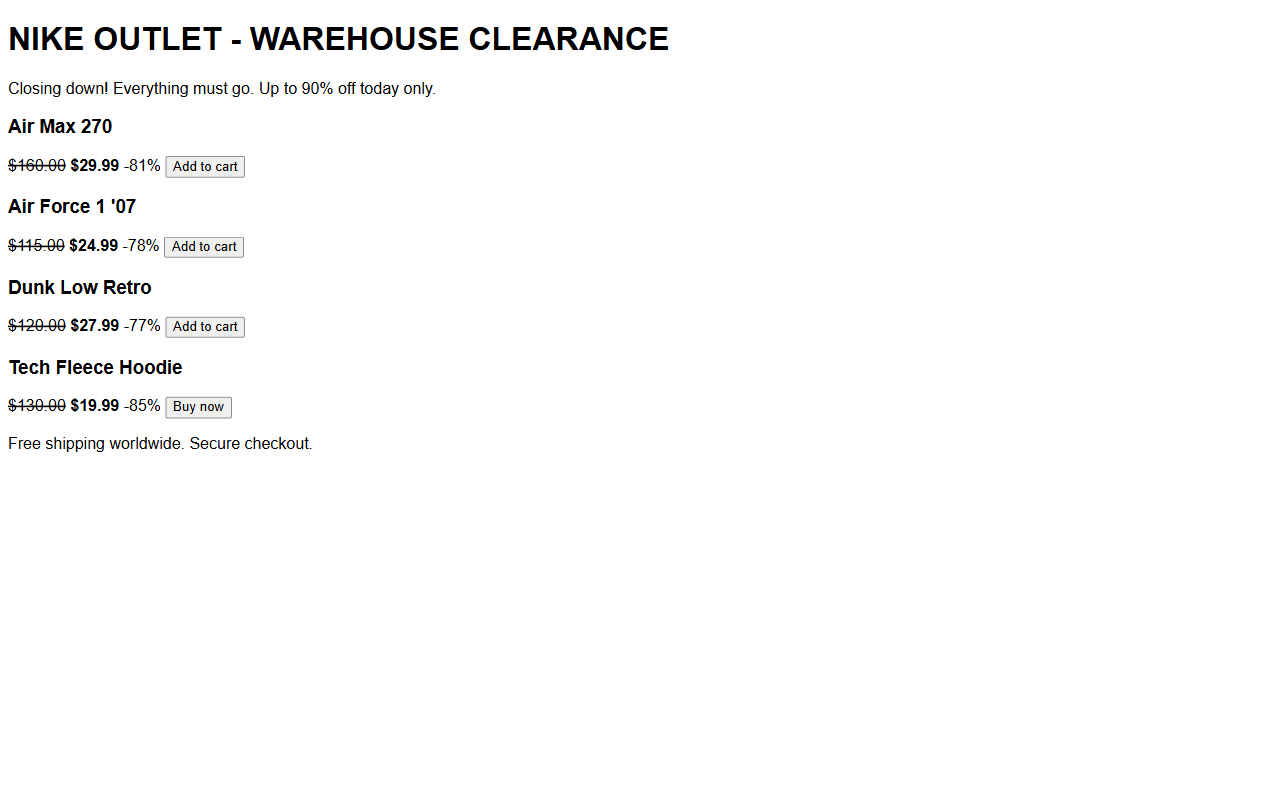
What PhishClean checks: since version 1.7.0 it warns when a shop sells a famous brand at implausible discounts from a website the brand doesn't own. A real shop's clearance sale on its own site isn't flagged.
To be fair: Norton also warns about fake shops. Guardio doesn't advertise a fake-shop warning.
4. Fake e-challan traffic fines in India (all year)
A text says your vehicle has an unpaid fine, often around ₹590, and that your licence will be suspended. Cyble found more than three dozen fake e-challan sites in one campaign. They copy the Parivahan portal, but they only take cards, because the goal is your card number, expiry date and CVV. A second version asks you to install an "RTO Challan" app that reads your OTPs.
What PhishClean checks: a page that follows a known Indian scam story (traffic fine, KYC update, electricity disconnection, held parcel, tax refund, reward points) and asks for card, UPI or OTP details on a site that isn't a real .gov.in or bank domain. Neither Guardio nor Norton describes a check built for these scripts. They rely on the site being reported. PhishClean runs in desktop browsers, so it can't stop the app version on your phone: never install an APK you were sent in a message.
5. Search results that lead to phishing
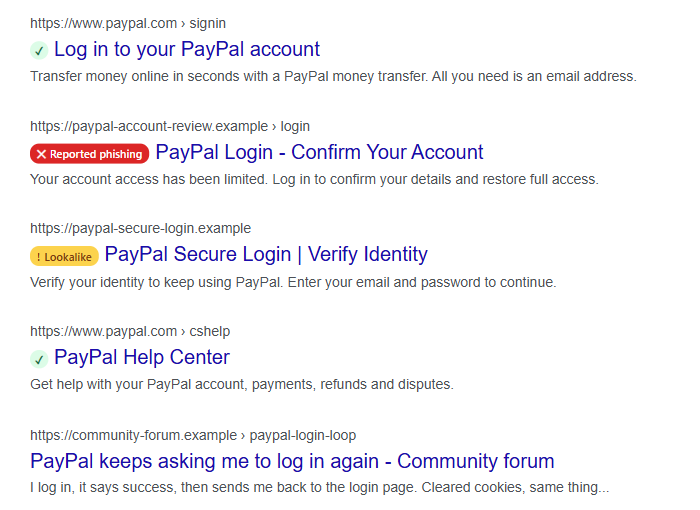
Several campaigns this year reached people through search results rather than email. Bitdefender saw Lidl-styled fake shops in sponsored results, and Malwarebytes found copies of Bitrefill's checkout on lookalike names. Since 1.7.0, PhishClean marks results on Google, Bing and DuckDuckGo before you click. Red means the site is on the reported list, which is free. Amber means the address imitates a well-known brand, which is part of the paid plan. Norton Safe Web rates search results too. Guardio doesn't advertise it.
Two real scams PhishClean won't reliably catch
No tool catches everything, and you should know where ours stops.
- A fake Free Mobile invoice (October). French customers were emailed about an unpaid €9.99 bill. The link went through two redirectors to a card form on
espace-free-mobile.pro, a domain registered about a month earlier. There's no password box, no copied brand name that PhishClean knows, and no Indian scam script, so PhishClean only warns once the site is on the reported list. Guardio and Norton are in the same position. - A fake antivirus "cancel your renewal" page (September). Malwarebytes found an AI-built Avast page that asked only for a name, email address and phone number, so scammers could call about the "payment" later. PhishClean's fake-virus check looks for a support number alongside scare messages. A quiet contact form doesn't trigger it. Norton customers are a favourite target of fake renewal emails like this.
The defence for both is the same: open the company's app or type its address yourself, and check the bill there.
Side by side
| PhishClean | Guardio | Norton | |
|---|---|---|---|
| Free plan | Reported-phishing blocking, link check on hover, password-destination check. No account needed. | Basic protection and manual scans | Norton Safe Web extension is free |
| Paid | $9 a month or $59 a year (India ₹149 or ₹999) | $14.99 a month, or $9.99 a month billed yearly | Norton 360 subscriptions |
| Where checks run | On your device | Guardio's servers | Norton's servers |
| Unreported phishing pages | Reads the page | Depends on its lists | Depends on site ratings |
| Search result badges | Yes | Not advertised | Yes |
| Fake shop warnings | Yes | Not advertised | Yes |
| Leaked passwords | Warns when a password you type has leaked | Email breach monitoring | Dark web monitoring in Norton 360 |
| Phone protection | No, desktop browsers only | Yes, mobile app | Yes, Norton 360 mobile |
| Antivirus, VPN, identity insurance | No | Insurance on premium plans | In Norton 360 plans |
Guardio's prices are from its website, checked in August 2026. Prices change, so check before you buy.
When to keep Guardio or Norton
- You want identity theft insurance or credit monitoring. PhishClean doesn't offer either.
- Your main worry is scam texts on your phone. PhishClean works in desktop browsers.
- You want antivirus and a VPN from the same company. Norton 360 does that, and PhishClean doesn't try to.
- You want malicious browser extensions detected. Guardio checks for these and PhishClean doesn't.
PhishClean is the better fit if you mostly want protection while you browse, don't want your browsing checked on someone else's server, and would rather pay $59 a year than $120. If you already pay for Norton 360 for its antivirus, you can add PhishClean on top. They don't conflict.
How to switch, or run both for two weeks
- Install PhishClean for Chrome, Edge, Firefox or Brave. Every check is on for 15 days, with no account and no card.
- Keep Guardio or Norton running alongside it. They check different things and don't get in each other's way.
- After two weeks, decide. If you drop Guardio, cancel the subscription in its settings first, then remove the extension.
- Setting this up for a parent? Our guide to protecting elderly parents from scams covers the conversation as well as the software.
Setting this up for a whole company? See the version of this post for organisations.
Sources
- Malwarebytes: Fake Claude Max giveaway hides a Google account phishing trap (23 September 2026)
- Malwarebytes: AI-powered phishkit arms criminals with account-hijacking tools in 10 minutes (7 October 2026)
- Bitdefender Labs: fake shops across Europe (June 2026)
- Cyble via IT Voice: fake e-Challan portals target Indian motorists
- Malwarebytes: Search results are sending people to fake Bitrefill checkouts (September 2026)
- Malwarebytes: Convincing Free Mobile phishing emails appear after data breach (1 October 2026)
- Malwarebytes: AI helps scammers build convincing antivirus renewal pages (September 2026)
Try every check for 15 days
No account and no card. Three checks stay free afterwards; the rest are $9 a month or $59 a year.
Install PhishClean freeLast updated: