What's new in PhishClean 1.8.0: warnings for what hacked sites show you
This week two critical flaws in PHP, PHP2Shell, put a large share of the web's sites at risk of being taken over. When ordinary sites get hacked in bulk, their visitors see the same few traps: a fake CAPTCHA, a fake browser update, a skimmer on the checkout. Those pages sit on real domains that every list says are fine. 1.8.0 adds warnings for each of them, based on what the page asks you to do rather than where it lives.
On its way to Chrome, Firefox and Edge. The stores review every update first; once they approve it, your browser installs it by itself, with nothing for you to do.
New, and free: fake CAPTCHAs that ask you to paste a command
"I'm not a robot." You tick the box, and the page says: press Windows + R, press Ctrl + V, press Enter. Ticking the box quietly copied a command to your clipboard, and those three keys run it. It installs malware that steals saved passwords, browser sessions and crypto wallets. Security researchers call this ClickFix, and it is now one of the most common ways people get infected. This month Microsoft tracked it on hacked sites, and Huntress found it behind a sponsored Google result for "amazon business".
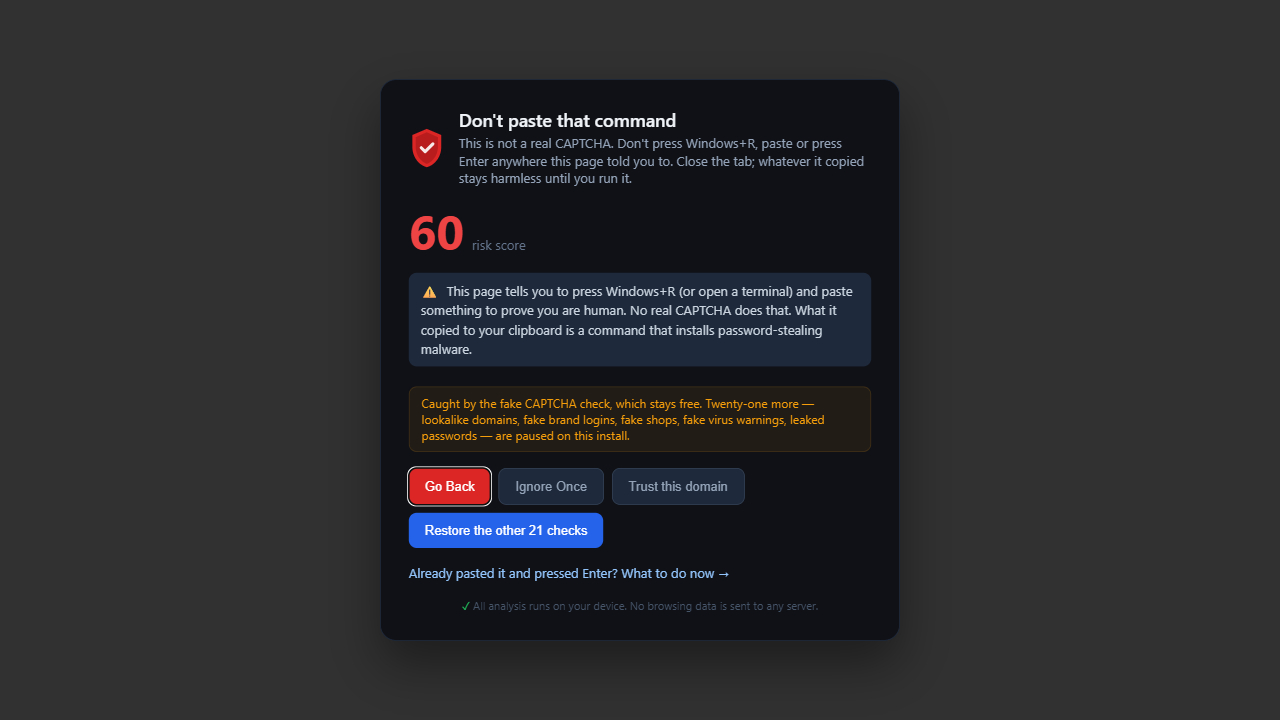
PhishClean now notices when a page copies a command to your clipboard and pairs it with a robot check or a Windows + R instruction. It also catches the variants that use Win + X, the Mac Terminal or the File Explorer address bar. Install pages for developer tools also copy commands and say "paste this in a terminal", and they don't get a warning. No real CAPTCHA ever asks you to press a keyboard shortcut.
This check is free for everyone, forever. The next step on these pages installs malware. And on a hacked site the address is real, so no blocklist would stop it. Already ran one? Here is what to do now.
New: fake browser updates
"Your Chrome is out of date. Update Chrome to continue." On a hacked site, the whole page is swapped for this screen, and the button downloads a script or installer instead of an update. It's been the standard payload on hacked WordPress sites for years.
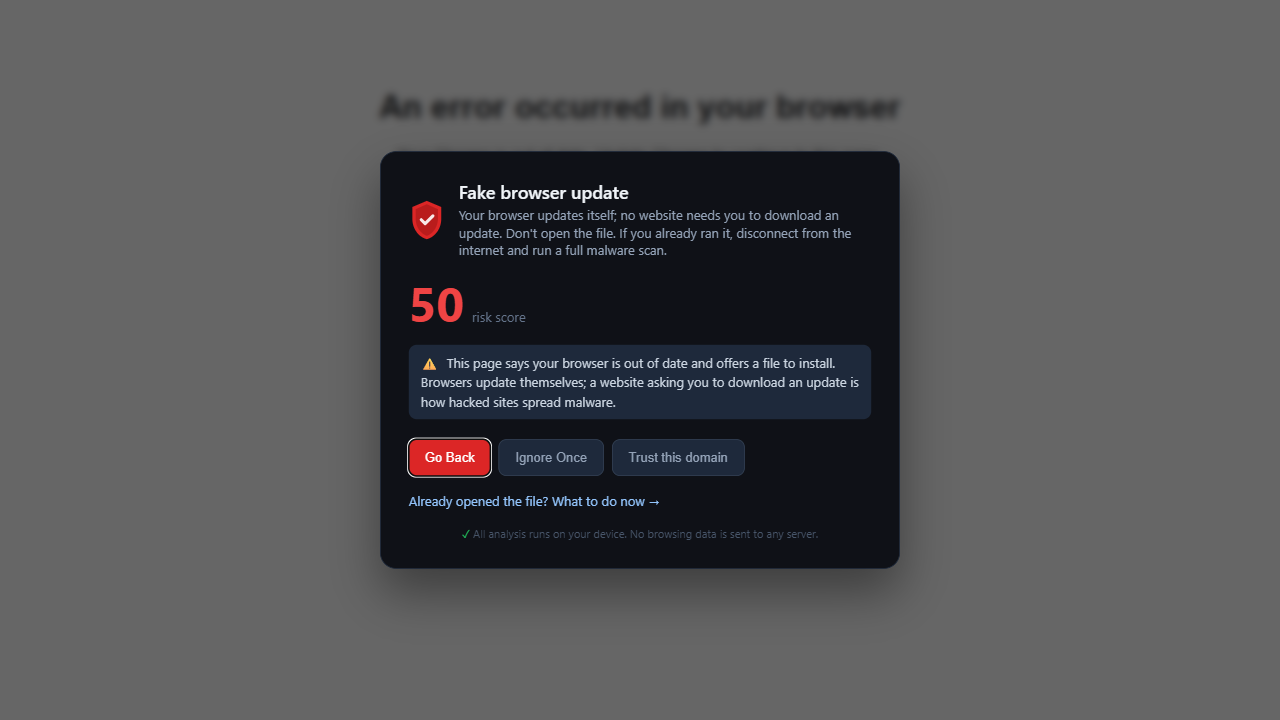
Chrome, Edge, Firefox and Safari update themselves and never send you to a website for it. PhishClean warns when a page claims your browser is out of date and offers a file to run, or an update button that doesn't lead to the browser maker. Banks and web apps that say "your browser isn't supported" link to Google, Mozilla or Microsoft, so those pages aren't flagged.
New: card skimmers on checkout pages
A skimmer is a few lines of code slipped into a shop's checkout. It copies the card number you type and sends it to the attacker while your order goes through as normal. You find out weeks later, from your bank. Hacked shops are where skimmers live. This month, one attacker reportedly used AI agents to break into more than 100 companies while targeting 1,200 online stores.
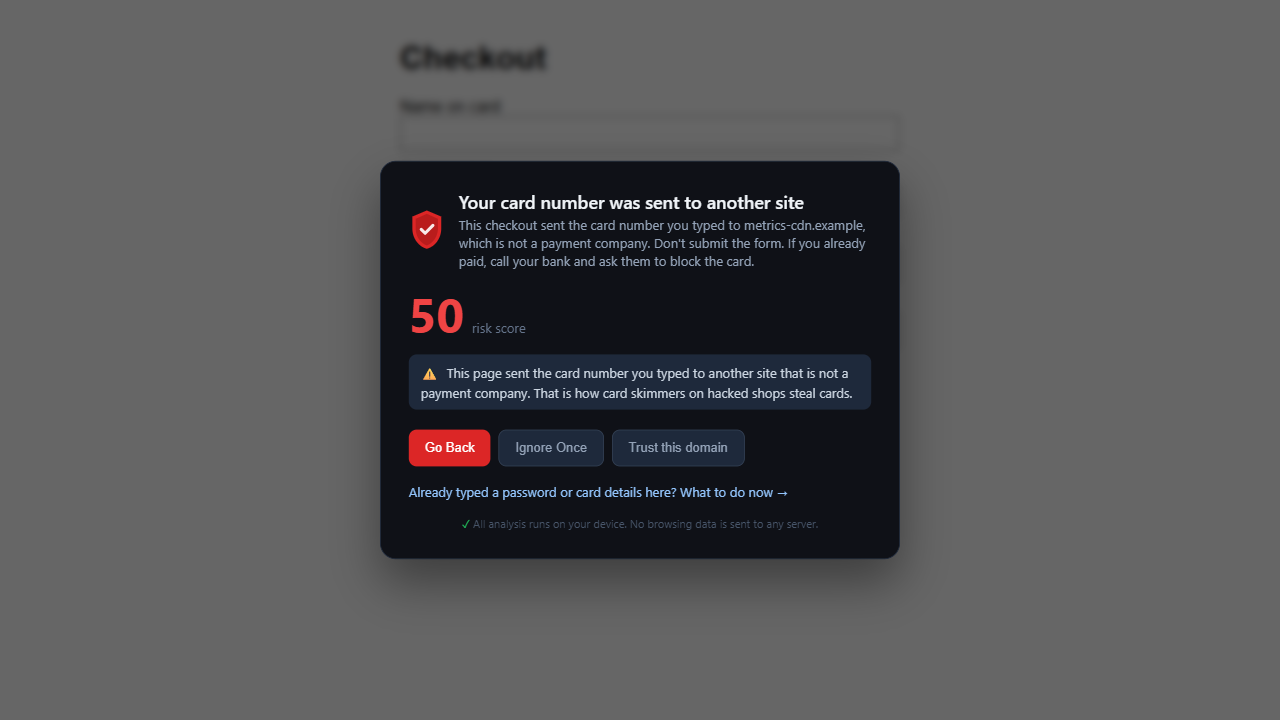
PhishClean now watches where the card number you type goes. Skimmers often disguise it as an analytics ping or an image request, so it checks those too. If it goes anywhere other than a payment company or the shop's own servers, you get a warning that names the receiving site. It also tells you what to do: don't submit, and if you already paid, call your bank to block the card. The card number is compared on your device and never leaves it; PhishClean only sees which site received it.
New: badges on scam search ads
Scam ads buy brand searches like "amazon business login" or "paypal customer service" and lead to a fake sign-in page. Since 1.7.0, PhishClean has marked search results; now it marks Google's sponsored results too. An ad that names a brand's sign-in or support but leads to a site the brand doesn't own gets an amber "Not Amazon" (or "Not PayPal") badge.
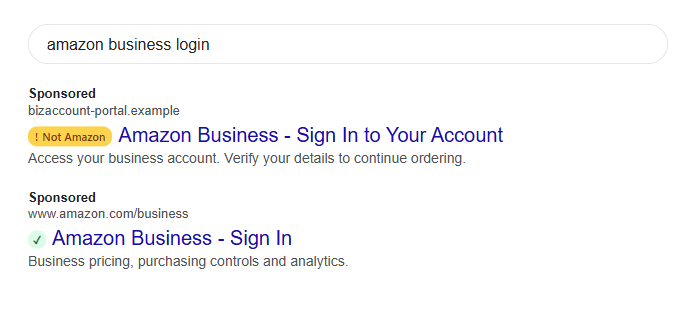
Resellers advertise brand products all the time ("Microsoft 365 Business Premium"), so product ads aren't marked. Only ads that point to a sign-in, an account or a support line somewhere the brand doesn't own get the badge.
The fake CAPTCHA warning is free. The fake update warning, the card skimmer warning and the scam-ad badges are part of the paid plan and included in the 7-day trial.
What the free plan includes now
| Check | Free plan | Paid plan and trial |
|---|---|---|
| Fake CAPTCHAs that ask you to paste a command (new) | Yes | Yes |
| Reported phishing sites, on pages and in search results | Yes | Yes |
| Link safety on hover | Yes | Yes |
| Password sent to another site | Yes | Yes |
| Fake browser updates (new) | No | Yes |
| Card skimmers on checkout pages (new) | No | Yes |
| Scam ads for brand sign-in pages (new) | No | Yes |
| Fake virus pages, fake shops, lookalike domains, fake brand logins, leaked passwords and 14 more | No | Yes |
That makes 25 checks in all, four of them free. The paid plan is $9 a month or $59 a year (in India, ₹149 a month or ₹999 a year), and it doesn't need an account.
Try every check for 7 days
No account needed to start, and four checks stay free afterwards.
Install PhishClean freeLast updated: