PhishClean for Teams

Stop your staff typing passwords into fake pages

One wrong click on a fake login page is all it takes to lose a company email account. PhishClean warns every employee before they enter a password or card number on a phishing page, and it collects nothing about the sites they visit.

$5 per user per month. No card for the pilot. Deploys to Chrome, Edge and Firefox by policy.

What it catches

Every check runs inside the browser, on the page in front of the employee, in real time.

Reported phishing sites

About 378,000 known phishing hosts are blocked before anyone can type into them, refreshed twice a day.

Brand-new fake logins

Pages that copy Microsoft 365, Google or a bank, lookalike domains one letter off, and forms that post a password to another site, caught before anyone has reported them.

Fake virus and support scams

"Your PC is locked, call Microsoft" pages get a warning that says plainly the computer is fine and the number goes to scammers.

Leaked passwords

A note when the password being typed has already appeared in a breach, checked without the password ever leaving the page.

Payment and KYC scams

Fake e-challan, KYC, refund and parcel pages that ask for card, UPI or OTP details on a site that isn't the real bank or government service.

Leaked keys and tokens

API keys, private keys and login tokens exposed in a page or a URL, for teams that build software.

Rolled out in minutes, and nothing to babysit

  • Deploy by policy. Force-install from Google Admin, Microsoft Intune, Group Policy or Firefox policies.json, with your organisation key. No agent, no proxy, no DNS change.
  • Nothing for staff to set up. No sign-up, no payment screens, no welcome tab. It shows up and works.
  • Your own sites stay quiet. List your sign-in and internal domains in the policy and PhishClean never warns on them.
  • Privacy your staff can trust. No URLs, page content or browsing history are sent to us, and so there is nothing for you to see either. The admin page shows how many browsers are protected, not who visited what. The extension source is public.
  • Easy security review. The only data we hold per browser is a random install ID and your organisation key.
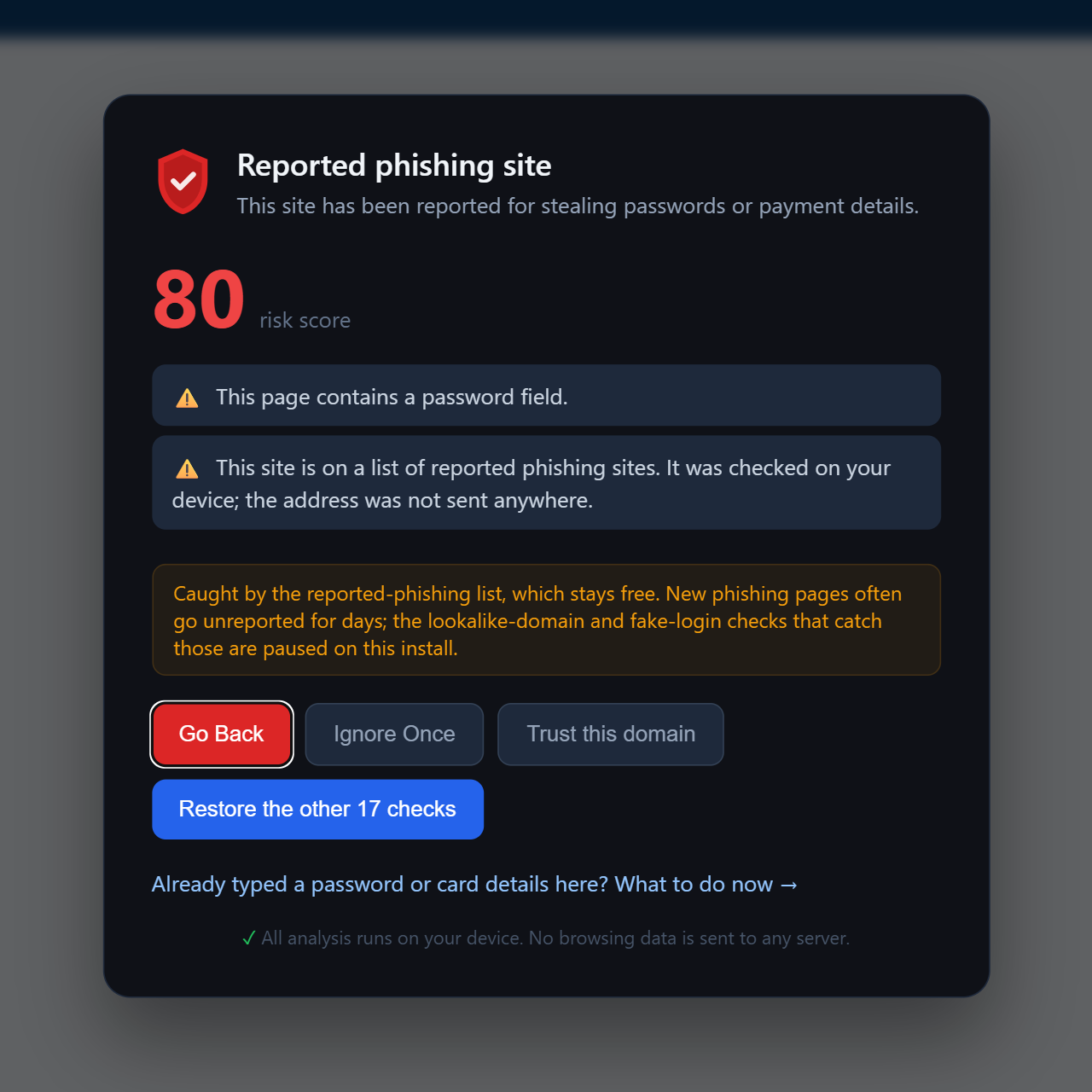
PhishClean full-page warning on a reported phishing site, with Go Back as the default button.

Simple per-user pricing

Minimum 5 users. Start with a free 30-day pilot on as many browsers as you like, then subscribe for the number of people you want covered.

Monthly
$5
per user / month
  • Every check, on every browser
  • Cancel any month
  • From $25 a month for 5 users
Yearly, 2 months free
$50
per user / year
  • Everything in monthly
  • One invoice a year
  • From $250 a year for 5 users

Card payment through Dodo Payments, with an invoice for every payment. Prefer bank transfer, or need more than 500 users? Talk to us.

Start your free pilot

You get an organisation key and an admin page straight away. No card, and nothing changes for your staff until you deploy.

Questions IT usually asks

Which browsers and devices does it support?

Chrome, Microsoft Edge and Firefox on Windows, macOS, Linux and ChromeOS, plus other Chromium browsers such as Brave. Deployment by policy needs browsers you manage: Google Admin (Chrome Browser Cloud Management or managed accounts), Intune or Group Policy for Windows, a configuration profile on macOS, or policies.json for Firefox.

Can employees turn it off?

Not when it is force-installed by policy: the browser keeps it installed and enabled. On a single page an employee can still choose "Ignore once" if they are sure a warning is wrong.

Do you see which sites our staff visit?

No. Detection runs entirely on the device. Each browser sends us a random install ID and your organisation key for licensing, and nothing else: no URLs, no page content, no detections. The admin page shows how many browsers are protected because that is all we know.

What happens when the pilot ends?

If you haven't subscribed, browsers fall back to PhishClean's free plan: reported-phishing blocking, link safety on hover and the password-destination check keep running. Nothing breaks and nothing is uninstalled. Subscribe at any point and every check comes back.

What if we add more people than we pay for?

Everyone stays protected. The admin page shows how many browsers are in use against your seats, and you can update the number when you're ready.

Will it slow anything down or break internal apps?

The checks are lightweight and run after the page loads. If an internal tool has an unusual login form, add its domain to trustedDomains in the policy and PhishClean will never warn on it.